

Most people picture wedding invitations as fancy printed cards delivered by mail. That traditional view misses the revolutionary shift happening right now. Modern wedding invitation templates are digital, customizable, and eco-friendly alternatives that transform how couples communicate with guests. These templates offer features like real-time RSVP tracking, multimedia integration, and mobile-responsive designs that paper simply cannot match. This guide explains what wedding invitation templates are, their key features, and how to choose or create one that fits your wedding vision perfectly.
Table of Contents
- Key takeaways
- What is a wedding invitation template?
- Features of modern digital wedding invitation templates
- Eco-friendly and hybrid wedding invitation options
- Practical tips for choosing and using wedding invitation templates
- Discover digital wedding invitations with The Digital Yes
- Frequently asked questions
Key Takeaways
| Point | Details |
|---|---|
| Real time RSVP | Modern templates support real time RSVP tracking with live updates as guests respond. |
| Eco friendly options | Digital invitations reduce printing costs and environmental impact while still delivering stylish designs. |
| Interactive multimedia | Templates enable links to wedding websites, embedded maps, videos, and photo galleries that printed invitations cannot provide. |
| Mobile and multilingual | Mobile responsive layouts ensure readability on phones and can accommodate multilingual guest lists. |
What is a wedding invitation template?
A wedding invitation template provides a structured format with placeholders for essential details like couple names, date, time, venue, and RSVP information. Wedding invitation templates are pre-designed, customizable layouts that save hours of design work while maintaining professional consistency. These templates come in two primary formats: digital files designed for email or online sharing, and printable layouts ready for physical production.
Templates eliminate the stress of starting from scratch. You simply fill in your specific details and adjust visual elements to match your wedding theme. Most platforms offer both free and premium options, giving couples flexibility based on budget and desired sophistication. The beauty lies in their adaptability.
Editable elements typically include:
- Text content and messaging
- Font styles and sizes
- Color schemes and backgrounds
- Images and decorative elements
- Layout structure and spacing
Digital templates particularly shine when couples want interactive features. You can link directly to your wedding website, embed location maps, or include video messages that paper invitations simply cannot support. For couples seeking truly unique designs, bespoke digital invitations offer complete creative freedom beyond template constraints. Many couples start with templates to understand their preferences, then customize extensively or commission custom work for the final product.
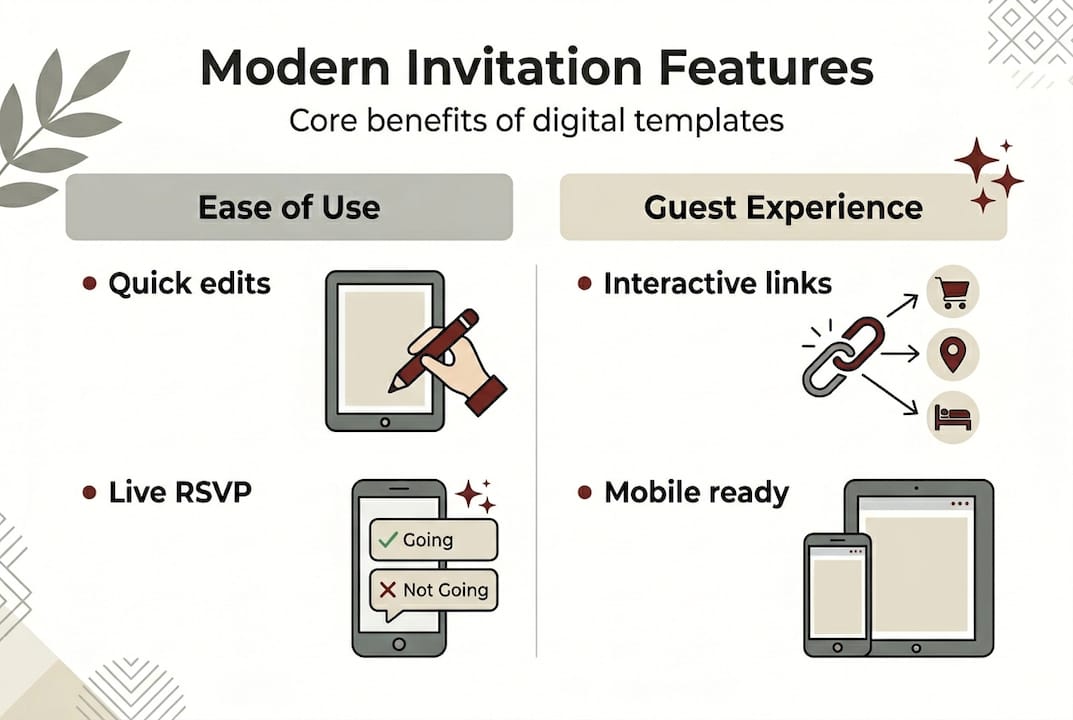
The practical advantage becomes clear when you need to make changes. Spotted a typo after sending? Digital templates allow instant corrections and resends. Venue changed last minute? Update once and notify everyone immediately. This flexibility transforms invitation management from a source of anxiety into a straightforward task that couples can handle confidently.
Features of modern digital wedding invitation templates
Digital wedding invitation templates have evolved far beyond simple electronic cards. Modern digital templates support customization with tools like Canva and AI-powered design assistants that let couples adjust fonts, colors, images, and text instantly. These platforms democratize professional design, making it accessible to anyone regardless of technical skill.
RSVP tracking represents one of the most valuable features. Platforms like Paperless Post and Greenvelope offer real-time RSVP monitoring through clickable links or QR codes that guests scan with their phones. No more chasing down responses or manually tallying reply cards. The system updates automatically as guests respond, giving couples a live dashboard of attendance numbers, meal preferences, and dietary restrictions.
Key digital features include:
- Embedded Google Maps showing venue locations with one-tap directions
- Photo galleries showcasing engagement photos or relationship milestones
- Background music or video messages that play when guests open the invitation
- Multi-language support for international guest lists
- Countdown timers building excitement as the wedding date approaches
Mobile responsiveness ensures invitations look stunning on any device. Over 70% of guests will first view your invitation on their phone, so templates automatically adjust layouts, resize images, and reformat text for optimal mobile viewing. This technical sophistication happens behind the scenes, requiring zero coding knowledge from couples.

Integration with tools like Google Forms or Jotform streamlines wedding RSVP tracking by automatically collecting responses in organized spreadsheets. Couples can export guest lists, filter by attendance status, and analyze data to make informed decisions about seating arrangements and catering quantities. The system does the administrative work so you can focus on enjoying your engagement.
Pro Tip: Test your digital invitation on at least three different devices (iPhone, Android, desktop) before sending to catch any formatting issues that might affect guest experience.
Modern digital wedding invitations with RSVP capabilities transform guest communication from a logistical challenge into an engaging, interactive experience that sets the tone for your celebration.
Eco-friendly and hybrid wedding invitation options
Environmental consciousness is reshaping wedding planning decisions. Paperless digital invites reduce waste and can save couples $300 to $800 per wedding, with 35% of couples now prioritizing sustainability when selecting invitation formats. Traditional paper invitations require trees, water, chemicals for printing, and fuel for delivery. Digital alternatives eliminate this entire supply chain.
The financial savings extend beyond printing costs. You avoid expenses for envelopes, postage stamps, addressing services, and the inevitable reprints when errors occur. For a 150-guest wedding, digital invitations typically cost $50 to $200 total, compared to $500 to $1,200 for quality printed versions. That difference funds other wedding priorities like photography, florals, or the honeymoon.
| Invitation Type | Average Cost | Environmental Impact | Formality Perception | Response Time |
|---|---|---|---|---|
| Digital Only | $50-200 | Minimal waste | Modern, casual | 24-48 hours |
| Print Only | $500-1,200 | High paper/fuel use | Traditional, formal | 2-3 weeks |
| Hybrid | $300-700 | Moderate impact | Balanced | 3-7 days |
Hybrid invitations combining digital and FSC-certified or seed-embedded paper achieve balance between tradition and modern convenience. This approach sends digital invitations to tech-comfortable guests while mailing physical versions to older relatives or those who prefer tangible keepsakes. Some couples even use seed paper that guests can plant after the wedding, creating lasting memories that grow into flowers or herbs.
Practical hybrid strategies:
- Send digital save-the-dates followed by formal printed invitations
- Mail printed invitations with QR codes linking to digital RSVP forms
- Offer digital invitations as default with printed versions available upon request
- Create printed invitations for VIP guests and digital for extended guest list
Digital invitations are convenient and eco-friendly but are sometimes perceived as less formal, while print remains elegant but costlier and more wasteful. Understanding these tradeoffs helps couples make informed decisions aligned with their values and guest demographics. A wedding with mostly millennial and Gen Z attendees might go fully digital, while one with many older guests benefits from hybrid approaches.
Pro Tip: Survey your guest list before deciding. Send a quick poll asking about digital invitation preferences to understand your specific audience rather than relying on general statistics.
The environmental impact resonates beyond the wedding day. Couples report feeling proud explaining their cost-saving wedding invitation choices to guests, often inspiring others to consider sustainable options for their own events. This ripple effect multiplies the positive impact of choosing eco-friendly invitation formats. For inspiration on effective designs, explore modern wedding invitation examples that successfully blend style with sustainability.
Practical tips for choosing and using wedding invitation templates
Selecting the right template requires strategic thinking about your specific needs and guest characteristics. Key tips include testing mobile views, ensuring WCAG accessibility, limiting data retention, and offering hybrid options for older guests who may struggle with digital formats. These considerations prevent common pitfalls that frustrate guests or create unnecessary complications.
Follow this selection process:
- Identify your must-have features (RSVP tracking, multimedia, language options)
- Test three to five templates on different devices to verify appearance and functionality
- Check loading speed, especially for invitations with videos or large image galleries
- Verify accessibility features like screen reader compatibility and keyboard navigation
- Review privacy policies and data handling practices of the platform
- Confirm customization limits to ensure the template meets your creative vision
Accessibility matters more than most couples realize. Use readable fonts sized at minimum 14 points, ensure sufficient color contrast between text and backgrounds, and verify templates meet WCAG standards for inclusivity. These adjustments help guests with visual impairments, color blindness, or other accessibility needs fully engage with your invitation. Simple choices like avoiding red-green color combinations or providing text alternatives for images make significant differences.
Effective RSVP management integrates Google Forms or Jotform and respects guest privacy with secure data handling. Set up automated confirmation emails so guests receive immediate acknowledgment of their responses. This simple touch reduces anxiety and prevents duplicate submissions from guests wondering if their RSVP went through.
Essential privacy practices:
- Limit data collection to necessary information only
- Use secure platforms with encryption for sensitive guest details
- Inform guests how their information will be used and stored
- Delete guest data after the wedding unless explicitly needed for thank-you notes
- Avoid sharing guest lists with third-party vendors without permission
Consider offering multiple RSVP methods for maximum inclusivity. While digital forms work perfectly for most guests, providing a phone number for verbal RSVPs accommodates elderly relatives or those uncomfortable with technology. This thoughtful approach ensures no guest feels excluded or frustrated by your invitation format. Some couples designate a tech-savvy family member to assist older relatives with digital RSVPs, creating helpful connections across generations.
Pro Tip: Create a simple instruction sheet with screenshots showing exactly how to RSVP digitally. Include this with any printed materials or send it proactively to guests who might need extra guidance.
Plan invitation wording carefully for edge cases like second marriages, plus-ones, or dietary requests. Clear communication prevents confusion and reduces follow-up questions. For comprehensive guidance on managing responses effectively, review strategies to organize wedding guest responses and simplify wedding RSVP management throughout your planning process. Additional wedding invitation RSVP wording tips help craft messages that elicit complete, accurate responses from guests.
Discover digital wedding invitations with The Digital Yes
Ready to experience the full potential of modern wedding invitations? The Digital Yes offers customizable digital wedding invitations with RSVP tracking that transforms guest communication into an effortless, elegant process. Their platform combines multimedia features, mobile-responsive designs, and real-time response monitoring in one intuitive system.
Every invitation includes integrated RSVP tracking that updates instantly as guests respond, eliminating manual data entry and spreadsheet headaches. Customize fonts, colors, images, and layouts to perfectly match your wedding aesthetic while embedded maps and photo galleries enhance guest engagement. The eco-friendly digital format reduces waste while maintaining the sophistication and beauty you want for your special day.
Expert support guides you through every step, from initial design to final guest communication. Whether you prefer template-based efficiency or bespoke creative freedom, The Digital Yes delivers wedding invitations that impress guests and simplify your planning. Explore their solutions today to discover how modern digital invitations can elevate your wedding experience.
Frequently asked questions
What exactly is a wedding invitation template?
A wedding invitation template is a pre-designed layout with editable placeholders for your wedding details like names, date, venue, and RSVP information. Templates come in digital formats for online sharing or printable versions for physical cards, offering structured designs that save time while allowing personalization. They range from simple text-based formats to elaborate designs with graphics, photos, and interactive elements.
How does digital RSVP tracking work with invitation templates?
Digital RSVP tracking embeds clickable links or QR codes directly in your invitation that guests use to submit responses. Their answers automatically populate a dashboard showing real-time attendance numbers, meal choices, and dietary restrictions without manual data entry. Most platforms send confirmation emails to guests and allow couples to export complete guest lists for vendor coordination. For detailed tracking strategies, explore this wedding RSVP tracking guide with proven management techniques.
Can I combine digital and printed wedding invitations?
Absolutely. Hybrid approaches send digital invitations to tech-comfortable guests while mailing printed versions to older relatives or those preferring tangible keepsakes. Many couples use digital save-the-dates followed by formal printed invitations, or send printed invitations with QR codes linking to digital RSVP forms. This flexibility accommodates diverse guest preferences while balancing cost, convenience, and tradition.
How do I ensure my digital invitation is accessible to all guests?
Use readable fonts sized at minimum 14 points, ensure strong color contrast between text and backgrounds, and verify your template meets WCAG accessibility standards. Provide text alternatives for images, enable keyboard navigation, and test with screen readers if possible. Offer multiple RSVP methods including phone options for guests uncomfortable with digital tools, and consider sending instruction sheets to those who might need extra guidance.
What should I know about privacy and data security for guest information?
Collect only necessary guest information, use secure platforms with encryption, and clearly inform guests how their data will be used and stored. Limit access to guest lists, avoid sharing information with third parties without permission, and delete data after the wedding unless needed for thank-you notes. Choose reputable invitation platforms with transparent privacy policies and robust security measures to protect sensitive guest details throughout your planning process.