

Creating a digital wedding invitation that truly engages guests while streamlining RSVP tracking feels overwhelming when you're juggling design choices, multimedia features, and guest management tools. Many engaged couples and planners struggle to balance customization with functionality, often ending up with invitations that miss the mark on either aesthetics or practicality. This guide breaks down the entire process into clear, actionable steps that help you design modern digital invitations featuring RSVP tracking, multimedia elements, and seamless guest communication. You'll learn exactly what tools you need, how to execute each design phase, and how to avoid common pitfalls that derail even well-planned invitation projects.
Table of Contents
- Key takeaways
- Preparation: essential tools and materials for digital wedding invitations
- Execution: step-by-step wedding invitation design process
- Verification: common mistakes and how to troubleshoot your wedding invitations
- Explore customizable digital wedding invitations with RSVP tracking
- FAQ
Key Takeaways
| Point | Details |
|---|---|
| Planning and prep | Proper planning defines invitation goals and gathers the necessary materials before design. |
| Platform with RSVP and multimedia | Choose a digital invitation tool that supports RSVP tracking, drag and drop design, multimedia embedding, and real time responses without coding. |
| Gather essential materials | Assemble a complete guest list, theme assets, and key invitation details to keep design momentum and prevent interruptions. |
| Test and validate | Test the platform with a sample invitation to confirm features and compatibility before full design. |
Preparation: essential tools and materials for digital wedding invitations
Before diving into design work, you need the right digital tools and a clear understanding of your invitation requirements. Start by selecting a platform that supports digital wedding invitations with RSVP functionality, as this foundation determines what features you can incorporate and how easily guests can respond. The best platforms offer drag and drop editors, multimedia embedding, and real-time response tracking without requiring coding knowledge.
Your essential materials checklist includes a complete guest list with accurate contact information, a defined wedding theme or color palette, high-quality images or videos you want to feature, and any music files that match your celebration's mood. Gathering these elements before starting design work prevents frustrating interruptions and keeps your creative momentum flowing. You'll also want to decide on key invitation details like event date, venue information, dress code, and any special instructions for guests.
Comparing platform options helps you choose the right tool for your specific needs:
| Platform Type | RSVP Tracking | Multimedia Support | Customization Level | Best For |
|---|---|---|---|---|
| Template-based | Built-in forms | Basic audio/image | Moderate | Quick launches |
| Custom builders | Advanced tracking | Full video/audio | High | Unique designs |
| Professional services | Managed dashboards | Premium integration | Complete | Complex events |
| DIY website tools | Manual setup | Limited embedding | Variable | Tech-savvy users |
Follow these preparatory steps to streamline your design process:
- Create a detailed guest list spreadsheet with names, emails, phone numbers, and plus-one status
- Collect all visual assets in a dedicated folder, organizing by category like photos, graphics, and videos
- Draft your invitation text including all essential details and RSVP deadline
- Research modern wedding invitation examples to identify styles that resonate with your vision
- Test your chosen platform's features with a sample invitation before committing to full design
- Confirm technical requirements like file formats and size limits for multimedia elements
Pro Tip: Start by mapping out your guest communication needs in a simple document. List what information guests must provide (meal choices, attendance confirmation, song requests) and what details they need from you (venue address, parking info, accommodation options). This exercise reveals exactly which features your invitation platform must support, preventing costly platform switches mid-project.
Understanding your technical requirements upfront saves hours of frustration later. Check whether your platform automatically sends confirmation emails, allows guest list exports, and supports mobile viewing, since most guests will open invitations on smartphones. The preparation phase might feel tedious, but it's the difference between a smooth design experience and a chaotic scramble to fix preventable issues.
Execution: step-by-step wedding invitation design process
With your tools and materials ready, you can now build your invitation systematically. This execution phase transforms your vision into a functional digital invitation that guests will love interacting with. Each step builds on the previous one, creating a cohesive experience that balances beauty with usability.
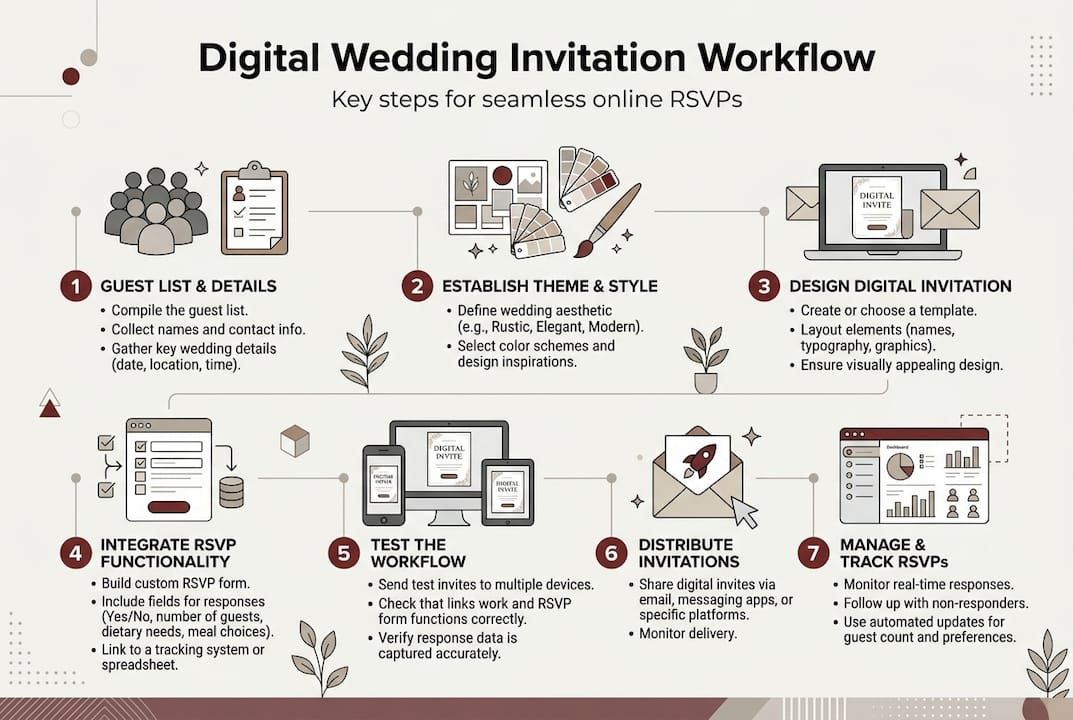
Follow this proven sequence for successful invitation design:
-
Select your invitation style by browsing templates or starting with a blank canvas that matches your wedding theme. Choose fonts that reflect your celebration's tone, whether elegant script for formal affairs or clean sans-serif for modern events. Your color palette should complement your wedding colors while ensuring text remains readable on all screen sizes.
-
Add multimedia elements strategically to enhance engagement without overwhelming guests. Music in wedding invites boosts engagement by 50%, making background audio a powerful tool for setting the mood. Upload a meaningful song clip that plays when guests open the invitation, or embed a video montage showcasing your relationship journey. Keep file sizes reasonable to ensure quick loading times.
-
Customize your text content with clear, concise language that covers all essential details. Include your names, wedding date and time, venue name and address, dress code, and any special instructions. Write your RSVP call to action prominently, specifying the deadline and what information guests need to provide. Break information into scannable sections rather than dense paragraphs.
-
Enable and configure RSVP tracking by setting up your response form with required fields like attendance confirmation, meal preferences, and dietary restrictions. Follow the wedding RSVP tracking guide to ensure your system captures all necessary data. Configure automatic confirmation emails so guests receive immediate acknowledgment of their responses, reducing follow-up questions.
-
Preview your invitation across multiple devices including desktop computers, tablets, and various smartphone models. Test every interactive element like buttons, forms, and embedded media to confirm they work flawlessly. Send test invitations to yourself and trusted friends, asking for honest feedback on both design appeal and functional performance.
Pro Tip: Test your invitation on both iOS and Android devices before sending to your full guest list. Design elements that look perfect on your iPhone might display awkwardly on Android phones, and multimedia features sometimes behave differently across operating systems. Catching these inconsistencies early prevents embarrassing technical issues and ensures every guest has a positive experience.
The execution phase requires patience and attention to detail, but following these steps methodically produces professional results. Review wedding invitation design examples throughout the process for inspiration and quality benchmarks. Remember that simplicity often trumps complexity, especially when guests need to quickly find key information and submit their RSVPs without confusion.

As you complete each step, save your work frequently and create backup versions before making major changes. This precaution lets you experiment with different design directions without fear of losing progress. The most successful invitations balance creative expression with practical functionality, giving guests a delightful experience while making response tracking effortless for you.
Verification: common mistakes and how to troubleshoot your wedding invitations
Even carefully designed invitations can harbor hidden issues that frustrate guests and complicate your planning process. The verification phase catches these problems before they impact your guest experience, ensuring your invitations work flawlessly when they reach inboxes. Systematic testing and troubleshooting now prevents panicked fixes later when RSVPs aren't coming in as expected.
Watch out for these frequent design pitfalls:
- Unclear RSVP instructions that leave guests confused about how or where to respond
- Broken multimedia links that result in error messages instead of playing your carefully selected music or videos
- Non-responsive designs that display poorly on mobile devices, forcing guests to zoom and scroll excessively
- Missing critical information like venue addresses, parking details, or accommodation recommendations
- Overly complex navigation that buries important details under multiple clicks
- Slow loading times caused by oversized image or video files
- Form fields that don't validate properly, preventing successful RSVP submission
Compare common mistakes with their solutions:
| Mistake | Impact | Solution |
|---|---|---|
| Vague RSVP deadline | Late or missing responses | Display specific date prominently |
| Uncompressed media files | Slow loading, abandoned views | Optimize files to under 2MB each |
| Desktop-only testing | Mobile display issues | Test on 3+ device types |
| Generic error messages | Frustrated guests | Write helpful, specific error text |
| No confirmation email | Guest uncertainty | Enable automatic acknowledgments |
Implement these verification steps before sending invitations:
- Click every button and link to confirm they direct to correct destinations
- Complete the entire RSVP process from a guest's perspective, checking for confusing steps
- Review all text for typos, incorrect dates, or outdated information
- Test multimedia playback in different browsers like Chrome, Safari, and Firefox
- Verify that your contact information is visible and accurate for guest questions
- Confirm that RSVP data flows correctly into your tracking system or spreadsheet
- Check that automatic emails contain accurate information and working links
Organizing wedding guest responses efficiently impacts your entire event planning timeline, making thorough verification essential. When RSVPs flow smoothly, you can finalize catering numbers, create seating charts, and coordinate other details with confidence. Conversely, broken RSVP systems force you to chase down responses manually, wasting precious time and energy.
If you discover issues during testing, prioritize fixes based on impact. Broken RSVP forms demand immediate attention since they prevent any responses from reaching you. Visual glitches might be annoying but rarely stop guests from finding essential information. Create a testing checklist that you work through systematically, marking off each item only after confirming it works perfectly.
Send test invitations to a small group of tech-savvy friends or family members, asking them to report any confusion or technical problems. Fresh eyes catch issues you've become blind to after hours of design work. Their feedback often reveals assumptions you made that aren't obvious to first-time viewers. Consider their suggestions seriously, especially regarding navigation and information clarity.
The verification phase might reveal that you need to simplify guest management by streamlining your RSVP form or reorganizing information hierarchy. Don't hesitate to make these changes even if they require reworking elements you thought were finished. A few extra hours of refinement now prevents weeks of frustration managing confused guests and incomplete responses.
Explore customizable digital wedding invitations with RSVP tracking
Designing your own digital wedding invitation teaches valuable lessons about guest communication and event planning, but professional platforms can elevate your results while saving significant time and stress. The Digital Yes specializes in creating modern digital wedding invitations with RSVP tracking that combine stunning design with powerful functionality, letting you focus on other wedding planning priorities while ensuring your invitations make the perfect first impression.
Our platform offers extensive customization options that go beyond basic templates, supporting multimedia integration, multi-language content, and sophisticated RSVP management without requiring any technical expertise. You get access to professional design elements, automatic guest communication tools, and real-time response dashboards that transform invitation management from a headache into a seamless experience. Whether you're planning an intimate gathering or a large celebration, our flexible solutions adapt to your specific needs while maintaining the personal touch that makes your invitation uniquely yours. Explore how professional digital invitations can simplify your wedding planning journey while creating memorable experiences for your guests.
FAQ
What is the best way to include RSVP tracking in digital invitations?
Embed RSVP forms directly within your digital invitation rather than linking to external survey tools, creating a seamless experience that increases response rates. Choose platforms with built-in tracking dashboards that automatically organize responses by attendance status, meal preferences, and other custom fields you define. This integrated approach eliminates manual data entry and provides real-time visibility into who's attending, making follow-up with non-responders straightforward. Review the RSVP tracking guide for detailed setup instructions and best practices.
How can I add multimedia features like music or videos to my wedding invitation?
Select a platform that natively supports embedded media rather than relying on third-party hosting that might break or expire before your wedding date. Upload audio files that autoplay softly when guests open your invitation, or embed video montages that play on click to avoid overwhelming the initial experience. Adding music to wedding invitations increases guest engagement significantly, making the extra setup effort worthwhile. Always test multimedia playback across different devices and browsers, optimizing file sizes to ensure quick loading without sacrificing quality. Browse modern wedding invitation examples to see effective multimedia integration in action.
What are common mistakes to avoid when designing digital wedding invitations?
Avoid burying critical information like venue addresses or RSVP deadlines under multiple navigation layers that frustrate guests trying to quickly find details. Ensure your design displays correctly on mobile devices since most guests will view invitations on smartphones, testing thoroughly across both iOS and Android platforms. Never use unclear RSVP instructions or broken links that prevent guests from responding, as these technical failures create unnecessary work chasing down responses manually. Check the common wedding invitation mistakes resource for comprehensive troubleshooting guidance that prevents these frustrating issues.
How far in advance should I send digital wedding invitations?
Send digital invitations six to eight weeks before your wedding date for local guests, giving them adequate time to arrange schedules while keeping your event top of mind. For destination weddings or events requiring travel, extend this timeline to three or four months so guests can book flights and accommodations at reasonable prices. Digital formats allow you to send save-the-date announcements even earlier without additional printing costs, then follow up with full invitations containing detailed information closer to the event. Set your RSVP deadline for three to four weeks before the wedding to allow sufficient time for finalizing catering numbers and seating arrangements.
Can I track who has viewed my digital wedding invitation?
Many professional digital invitation platforms include analytics that show when guests open invitations and how long they spend viewing content, providing valuable insights into engagement levels. This tracking helps you identify who might need gentle reminders to RSVP and which guests are actively engaged with your invitation materials. However, basic email tracking only confirms delivery and opens, not detailed interaction data, so choose platforms with robust analytics if this visibility matters to you. Use viewing data thoughtfully to inform follow-up strategies without becoming overly focused on metrics that don't directly impact your planning needs.